The five options
Every option runs the same tournaments on ChessRooq: the same pairings, clocks, results and standings. What changes is where the pages live and how much your academy builds. Options can be mixed (the demo academy uses 3, 4 and 5 together), and you can move to another option later without losing anything.
your-academy.arbiter.chessrooq.com. Live the same day.
One DNS record2 · Your own domainThe same, on tournament.youracademy.in. About an hour.
Paste a frame3 · Pages inside your siteEvent pages within your website. About 15 minutes.
Back-end work4 · Your app, our boardYour server makes 6 kinds of API call and receives results; players use our board. A few days.
Back-end + front-end work5 · Your own screensOption 4, plus you build the game screen yourself. One to two weeks.
Who's who
Five kinds of people and systems take part. The words below are used the same way everywhere in this guide.
| Who | What they are | How they get in |
|---|---|---|
| ChessRooq (the platform) | Runs ChessRooq Arbiter: the tournament engine, pairings, clocks, results, the servers. ChessRooq staff set up academies, plans and API keys, and give support. | ChessRooq's own admin site, staff only |
| Academy (the customer) | A chess academy, club or school that runs events on ChessRooq. Each academy is a separate account: its players, events and settings are never visible to another academy. | Its console at your-academy.arbiter.chessrooq.com |
| Academy staff | People of the academy, each with a role: Admin, Organiser, Arbiter or Viewer (next table). | Email and a 6-digit code; no passwords |
| Partner | The organisation whose own software connects to ChessRooq: the academy's website or app team, or a platform that serves students (a coaching or student-management app). The partner holds the academy's API key on its server. Only options 4 and 5 have a partner (option 3 needs only a pasted frame). In the demo academy, its own server is the partner. | An API key, used by its server only |
| Player | A student playing in an event. Needs no ChessRooq account. | A private game link, from the academy or the partner's app |
| Parent / spectator | Anyone following an event. | The event's public page or 6-digit code |
Academy staff roles
| Role | Can do | Cannot do |
|---|---|---|
| Admin | Everything in the academy: events and players; staff and their roles; Settings (logo, colours, sites allowed to embed, own domain); billing and wallet; download all data, erase a player's data | See other academies; issue API keys (ChessRooq does) |
| Organiser | Create and run events: players, entries, pairings, results and corrections, certificates, exports, online game links | Staff, Settings, billing, data export and erase |
| Arbiter | The same as Organiser today (meant for the person running rounds and results in the hall) | The same as Organiser |
| Viewer | See everything an Organiser sees | Change anything |
A partner's API key can do what an Admin can, for its own academy only.
Who sees what
| Player | Parent / public | Academy staff | Partner (its server) | ChessRooq | |
|---|---|---|---|---|---|
| Where | Their board (ChessRooq's, or the partner's own screen) | Public event page | The academy console | API and webhooks | ChessRooq admin site |
| Event pairings, results, standings | Their own game; the public page | Yes | Yes | Yes | Counts only (players per month, events) for billing |
| Live games | Their own: moves and clocks; plays their own pieces only | Live boards while an event runs | All the academy's games | All the academy's games (viewer links) | No |
| Player details (birth date, contacts, guardian) | No | Never: names and results only | Yes (Admin, Organiser, Arbiter, Viewer) | Yes, for its academy | Not in the admin site; only when needed for support, under the data agreement |
| Staff and settings | No | No | Admin only | Settings and staff, through the API | Staff list, plan, status |
| Billing | No | No | Admin only | Through the API | Every academy: plans, wallets, invoices |
| API keys | No | No | No | Its own key (it never sees others) | Issues and revokes keys; sees only their first characters |
| Other academies | Never: every academy is walled off, down to the database | All academies (to run the service) | |||
Technical details and impact
Technically, what each option involves
| 1 · ChessRooq address | 2 · Own domain | 3 · Inside your site | 4 · Your app, our board | 5 · Your own screens | |
|---|---|---|---|---|---|
| Where the pages run | On ChessRooq | On ChessRooq, under your address | Your website, with ChessRooq pages in frames | Your app; the board from ChessRooq | Your app, all of it |
| What you build | Nothing | One DNS record | Paste a frame into a page | Server code for 6 kinds of API call (students, event, entries, start, pairing, game link) and one webhook receiver. Details | Option 4, plus the game screen in your app: board, clocks, moves, draw and resign, reconnecting. Details |
| Partner? | No | No | No (a frame only) | Yes: your server holds the key | Yes |
| Skills needed | None | Access to your domain's DNS | Editing your website | A back-end developer (any language) | Back-end and front-end developers |
| API key | No | No | No | Yes, on your server only | Yes, on your server only |
| Where the live game connects | Always straight to ChessRooq, so the clocks are exact. In 4 and 5 your server only hands out a short-lived link per student. | ||||
| Updates and fixes from ChessRooq | Automatic | Automatic | Automatic | Automatic (the board is ours) | You update our components when you choose; the protocol only adds within v1 |
| Time to launch | Same day | About an hour (DNS) | About 15 minutes | A few days | One to two weeks |
What it changes for your academy
| 1 · ChessRooq address | 2 · Own domain | 3 · Inside your site | 4 · Your app, our board | 5 · Your own screens | |
|---|---|---|---|---|---|
| Brand | Your name, logo and colours; our address | Your name, colours and address | Inside your own site and menu | Your app; the board in your colours | Entirely your design |
| For players and parents | A ChessRooq page; parents follow with a 6-digit code | The same, on your address | They never leave your website | Your login; the board opens inside your app | Your login and screens throughout |
| Student records and login | Kept on ChessRooq for your academy; staff sign in with an emailed code | As 1 for events; your site stays yours | Your system keeps students and login; ChessRooq keeps only what events need, under your ids | ||
| Your upkeep | None | Keep the DNS record | Change the event code each event (or automate with the API) | Run the server; keep the key safe | Run the server and your screens |
| Best for | First events, clubs, any academy | Academies that want their own address | Academies with a website already | Platforms with their own app or student portal | Platforms that want their own look or native apps |
Before you integrate
Who provides what
| ChessRooq provides | Your academy provides |
|---|---|
| Your academy account, on the sandbox first and on live when you are ready | Academy name, logo and colours |
Your address: your-academy.arbiter.chessrooq.com, with a padlock | Staff email addresses (they sign in with an emailed code; no passwords) |
The API key (options 4 and 5): ChessRooq creates it when it sets up your academy and shows it once. We hand it to your technical lead directly, never in a group chat. A sandbox key starts crq_test_, a live one crq_live_. Rotation without downtime: ask for a new key, switch your server to it, and we revoke the old one once it is no longer used. If a key is ever exposed, tell ChessRooq straight away: we revoke it at once and issue a new one. | A technical contact (options 2 to 5) |
| API reference, this guide and the sample code on this site | Your website's address, to allow frames (options 3 and 4) |
| A webhook secret, returned when you register your webhook (options 4 and 5) | A public https URL on your server for webhooks (options 4 and 5) |
| Help on a call while you build | Your student id format, and which student details you will share (options 4 and 5) |
| Your domain and access to its DNS (option 2) |
Pre-steps, in order
- Agree the option on a short call with ChessRooq (several can be combined).
- ChessRooq creates your academy on the sandbox and sends your address, the staff sign-in, and for options 4 and 5 the sandbox API key.
- Sign in and set up: in your console, Settings for logo, colours and "Sites allowed to embed your pages"; Staff for your coaches and arbiters.
- Connect with the steps for your option below. Use made-up students and the sandbox key while you build.
- Test a real event on the sandbox: an over-the-board round and an online game.
- Go live: ChessRooq moves your academy to live and issues a
crq_live_key (details).
What each option needs
| You need | 1 | 2 | 3 | 4 | 5 |
|---|---|---|---|---|---|
| An academy on ChessRooq (we create it) | Yes | Yes | Yes | Yes | Yes |
| Your domain's DNS | No | Yes | No | No | No |
| Your website's address allowed to embed | No | No | Yes | Yes (to frame the board) | No |
| An API key, kept on your server only | No | No | No | Yes | Yes |
| A server of your own (any language) | No | No | No | Yes | Yes |
| Front-end code with our components or WebSocket | No | No | No | No | Yes |
| Address | What it is |
|---|---|
https://sandbox.api.arbiter.chessrooq.com | The API (sandbox). Every call sends Authorization: Bearer crq_test_… |
| /docs · /openapi.yaml | Full API reference and the OpenAPI 3.1 file (generate a client in any language) |
https://<academy>.arbiter.chessrooq.com | Your academy's console, public event pages and the board |
wss://<academy>.arbiter.chessrooq.com/rt/v1?token=… | The live game connection (option 5). Protocol |
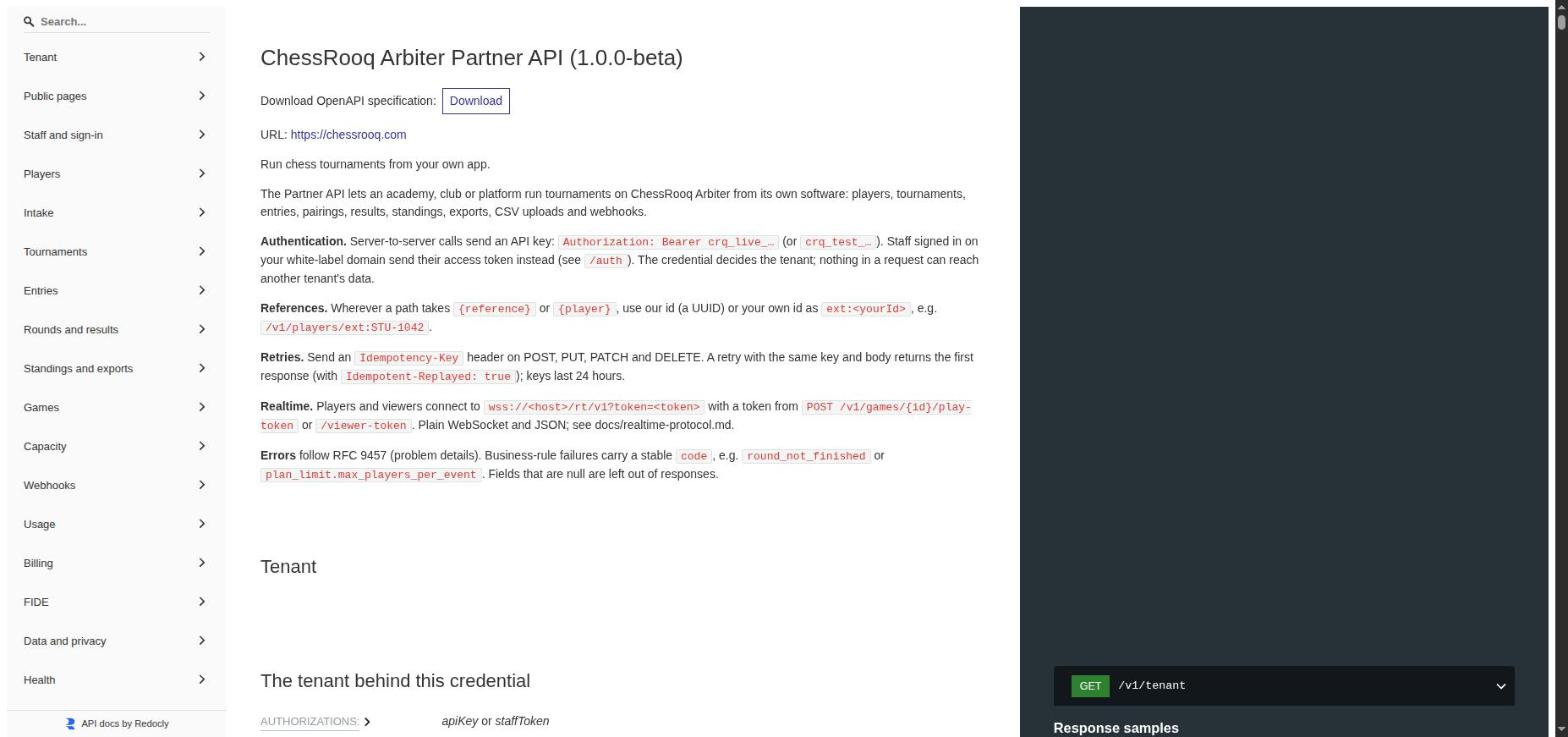
/docs: every endpoint with examples. Your own ids work anywhere a player or event is named, as ext:<yourId>.How the pieces fit
Option 3 is a frame straight from ChessRooq. Options 4 and 5 put your server in the middle for everything except the live game itself, which always connects straight to ChessRooq so clocks stay exact.
Option 1 · Your academy's own ChessRooq address
Nothing to build: your academy gets its own address on ChessRooq, with your name, logo and colours. Staff run events in the console; players and parents use the public pages and game links.
ChessRooq creates your academy
Your address, e.g. urali.arbiter.chessrooq.com, works with a padlock about a minute later.

Staff sign in and set up
At /signin, with the email address ChessRooq registered; a 6-digit code arrives by email. In the console: Settings for logo and colours, Staff to add coaches and arbiters.

Run events
Tournaments → New tournament; add players by hand or from a spreadsheet; start; pair rounds; enter results (over the board) or hand out game links from Online play (online). Share the event's 6-digit code with parents.
Option 2 · The same, on your own domain
Exactly option 1, on an address you own, such as tournament.youracademy.in. Inside ChessRooq it is the same academy: same console, same data; only the address in front changes.
Add your domain
Console: Settings → Web addresses → Use your own domain, and type it. Or with the API:
curl -s -X POST $API/v1/tenant/domains -H "$KEY" -H "Content-Type: application/json" \
-d '{"host":"tournament.youracademy.in"}'Create the DNS record it shows
At your domain provider: for a subdomain (recommended), a CNAME from tournament to edge.arbiter.chessrooq.com. A bare domain (youracademy.in) cannot use a CNAME: Settings shows the A record to use instead.
Wait for "Active"
Once the DNS record is visible (minutes to an hour), ChessRooq issues the padlock certificate by itself and the status turns Active. Game links ChessRooq hands out then use your domain. Staff may need to sign in once more on the new address.
Option 3 · ChessRooq pages inside your website
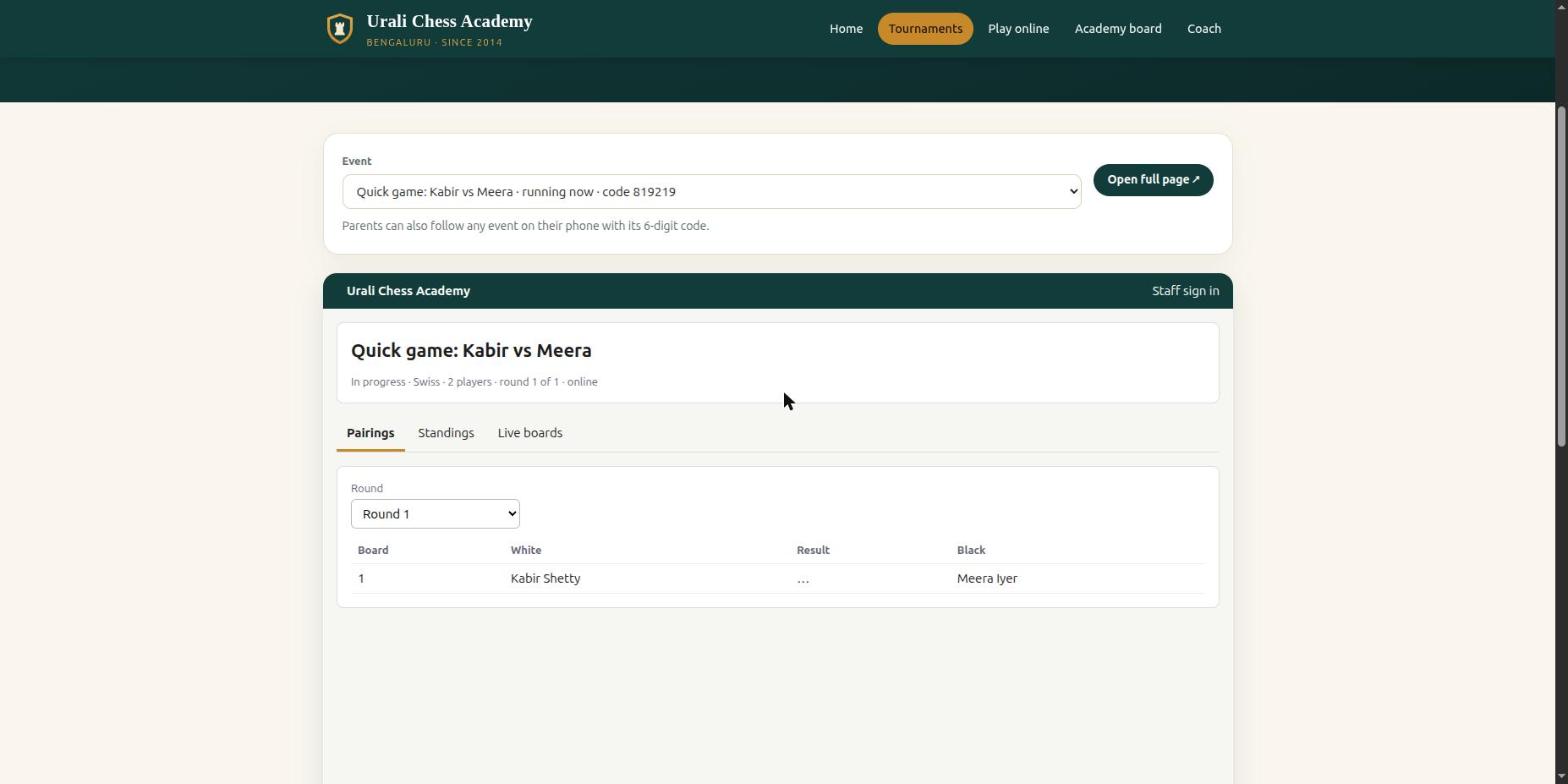
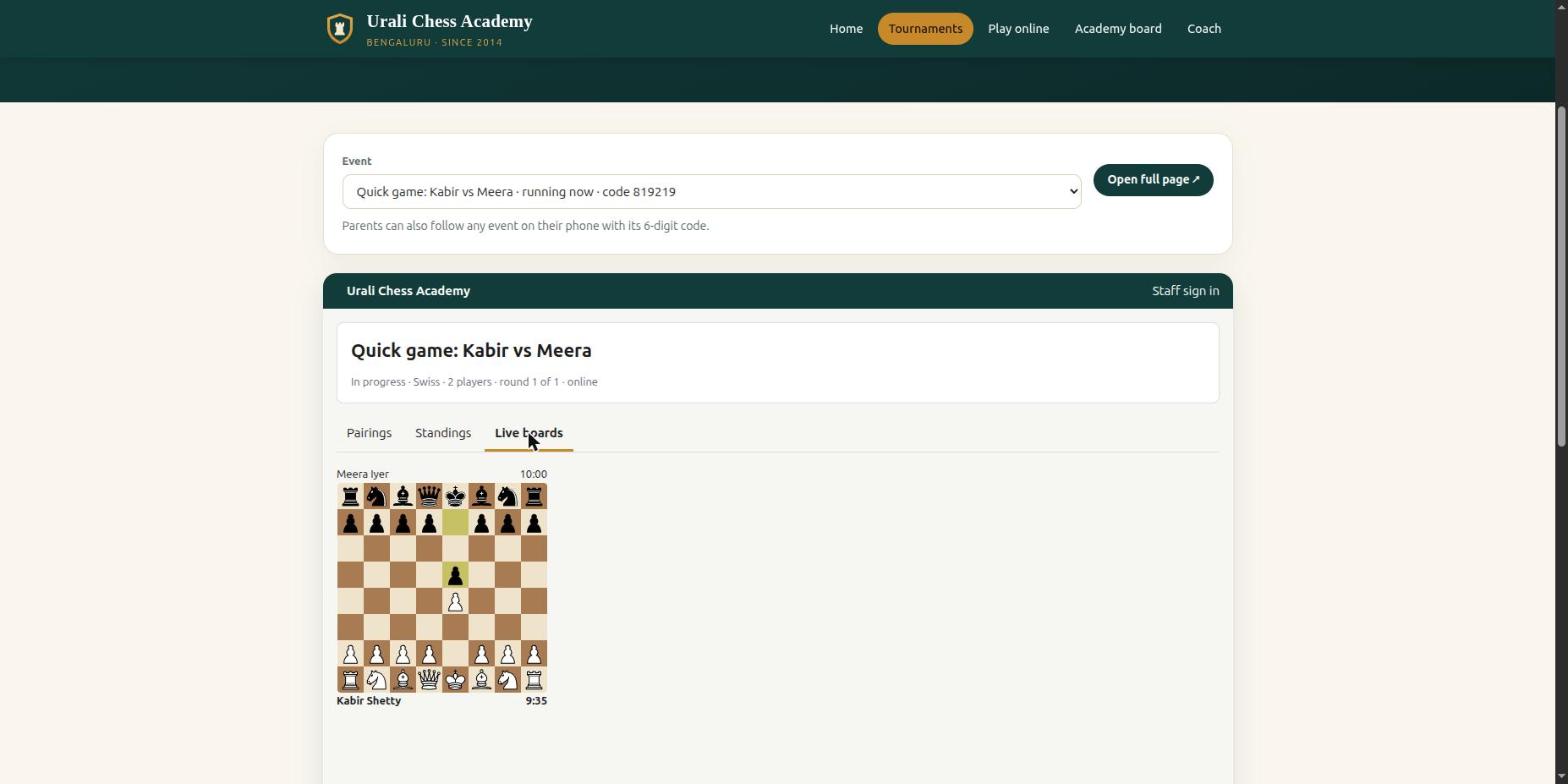
Your site shows ChessRooq's event page (pairings, standings, live boards) in a frame. No code beyond a paste. See it working on Tournaments.
Allow your website to show ChessRooq pages
Browsers only let a page appear in a frame on sites the owner allows. In your ChessRooq console: Settings → Sites allowed to embed your pages, add your site's address (scheme and host only), e.g. https://demo.chessrooq.com.
With the API instead: branding is replaced as a whole, so fetch it, add the address, and send it all back.
API=https://sandbox.api.arbiter.chessrooq.com
KEY="Authorization: Bearer crq_test_YOUR_KEY"

curl -s $API/v1/tenant/branding -H "$KEY" > branding.json        # what you have now
# edit branding.json: add  "embedOrigins": ["https://demo.chessrooq.com"]
curl -s -X PUT $API/v1/tenant/branding -H "$KEY" \
-H "Content-Type: application/json" --data @branding.jsonFind the event's 6-digit code
Each event has a code: in the console's event list, or from the API (code in each item).
curl -s "$API/v1/tournaments?limit=10" -H "$KEY"
# → { "items": [ { "id": "8943d97a-…", "code": "819219", "name": "Quick game: Kabir vs Meera", "status": "in_progress", … } ] }Paste the frame into your page
<iframe src="https://urali.arbiter.chessrooq.com/t/819219"
        title="Tournament" loading="lazy"
        style="width:100%;height:980px;border:0;border-radius:16px"></iframe>
Use your academy's address and the event's code. To show a different event each week, put the code in from your site's own settings, or list events with the API as the demo academy's Tournaments page does.
Option 4 · Your app and login, ChessRooq's board
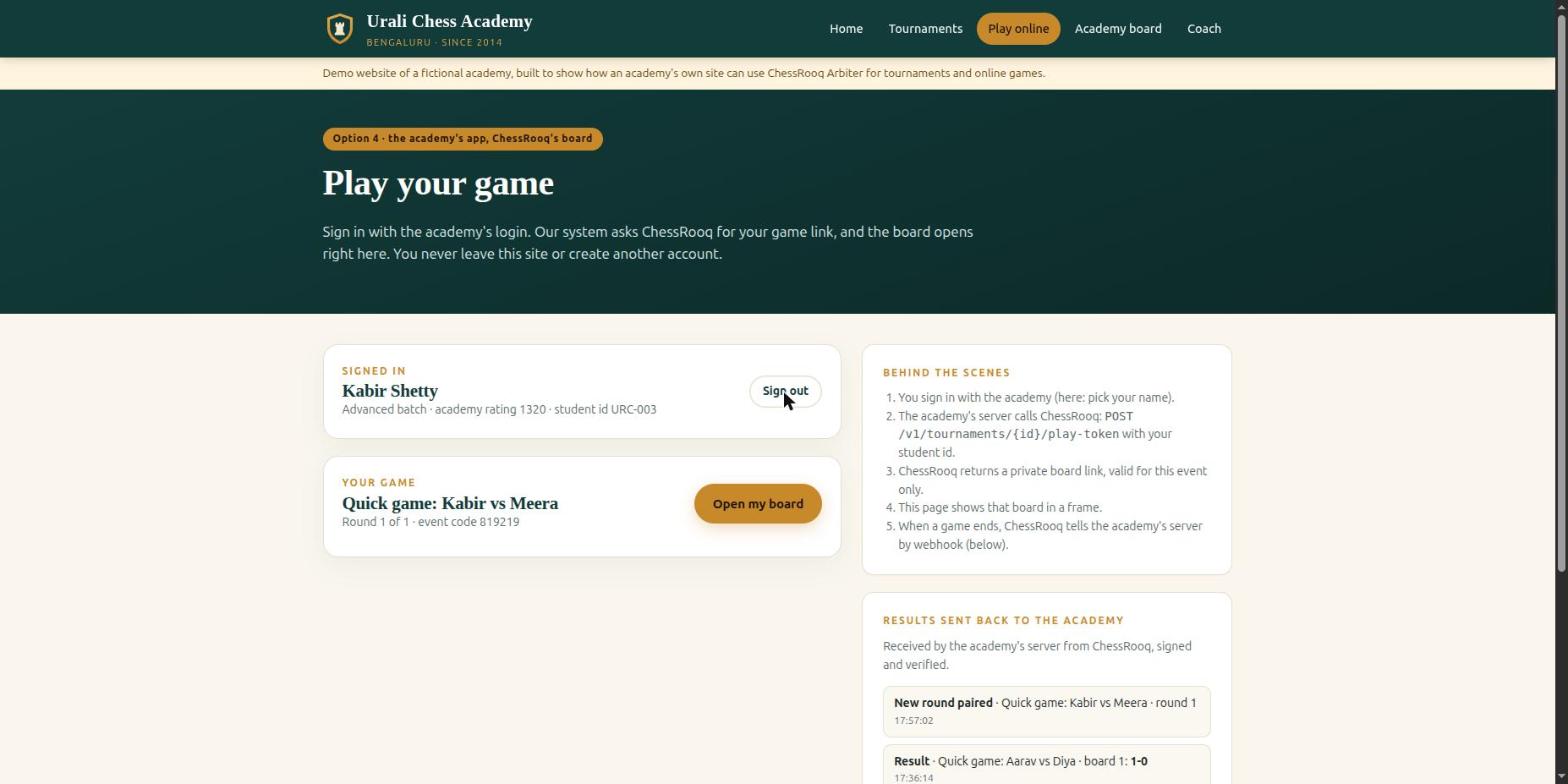
Your system keeps the students, the login and the screens. Your server asks ChessRooq to run the events and for each student's board link, and gets results back by webhook. Students never see a ChessRooq page except the board. See it on Play online; the whole server is one file: academy-server.mjs (Node 18+, no libraries).
PUT /v1/players/{yourId}: send or update a student (step 2)POST /v1/tournaments: create an event (step 3)POST …/entries: enter students (step 3)POST …/start: start the event (step 3)POST …/rounds: pair round 1 (later rounds can pair by themselves) (step 3)POST …/play-token: a student's game link, each time they open their game (step 4)
POST /v1/webhooks, then check the signature on each result that arrives (step 6). Any language works: it is plain HTTPS and JSON.Get your API key and keep it on the server
ChessRooq creates your academy and shows the key once (crq_test_… on the sandbox, crq_live_… when live). Store it as a server setting, never in web or app code.
# the demo's server reads it from its environment (a file only the server can read)
ARBITER_API=https://sandbox.api.arbiter.chessrooq.com
ARBITER_KEY=crq_test_…
All calls go through one helper (academy-server.mjs, line 36). It also sends an Idempotency-Key on every POST, so a retry after a network error never creates a second event.
Send your students, with your own ids
ChessRooq keeps a player for each of your students, under your id. Safe to repeat: the same id updates the same player.
curl -s -X PUT $API/v1/players/URC-001 -H "$KEY" -H "Content-Type: application/json" \
     -d '{"firstName":"Aarav","lastName":"Rao","club":"Urali Chess Academy"}'
From then on, refer to the student as ext:URC-001 anywhere. Many at once: POST /v1/intake/csv. In the demo: syncStudents(), line 48.
Create an event, enter students, start, pair
# create (online, 5+3, rounds pair themselves 30 s after each round)
curl -s -X POST $API/v1/tournaments -H "$KEY" -H "Content-Type: application/json" -d '{
  "name": "Saturday Club Night", "externalId": "urali-2026-11-29",
  "format": "swiss", "mode": "online", "maxPlayers": 16, "roundsPlanned": 3,
  "baseSeconds": 300, "incrementSeconds": 3, "autoPairNextRound": true, "secondsBetweenRounds": 30 }'

E=ext:urali-2026-11-29     # your id for the event works everywhere too
curl -s -X POST $API/v1/tournaments/$E/entries -H "$KEY" -H "Content-Type: application/json" \
     -d '{"entries":[{"player":"ext:URC-001","rating":1480},{"player":"ext:URC-002","rating":1410}]}'
curl -s -X POST $API/v1/tournaments/$E/start  -H "$KEY"
curl -s -X POST $API/v1/tournaments/$E/rounds -H "$KEY"     # pairs round 1
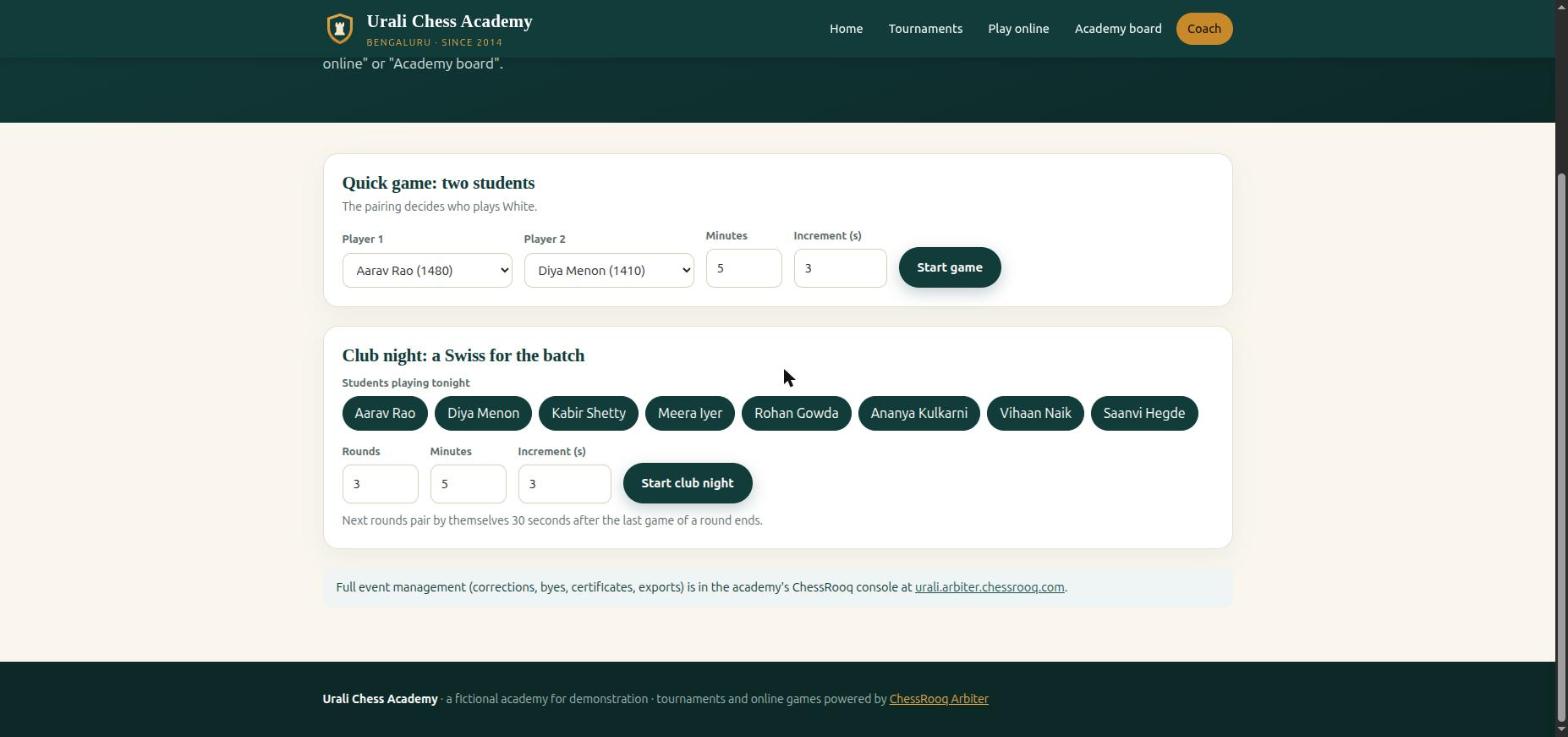
In the demo, the coach desk does this behind two buttons (createEvent(), line 60).
Get the student's board link
When a signed-in student opens their game, your server asks for a token for that student. A tournament token follows them through every round.
curl -s -X POST $API/v1/tournaments/$E/play-token -H "$KEY" -H "Content-Type: application/json" \
     -d '{"player":"ext:URC-001"}'
# → { "token": "…", "expiresAt": "…",
#     "pageUrl": "https://urali.arbiter.chessrooq.com/play/#token=…",   ← option 4: show this page
#     "url":     "wss://urali.arbiter.chessrooq.com/rt/v1?token=…" }    ← option 5: connect to this
In the demo: the POST /api/play-link route, line 131. Only the signed-in student's own token is ever handed out.
Show the board
Put pageUrl in a frame (your site must be allowed to embed, option 3 step 1), open it as a link, or load it in a phone app's WebView.
<iframe src="{pageUrl from step 4}" title="Your game" allow="autoplay"
        style="width:100%;height:860px;border:0;border-radius:16px"></iframe>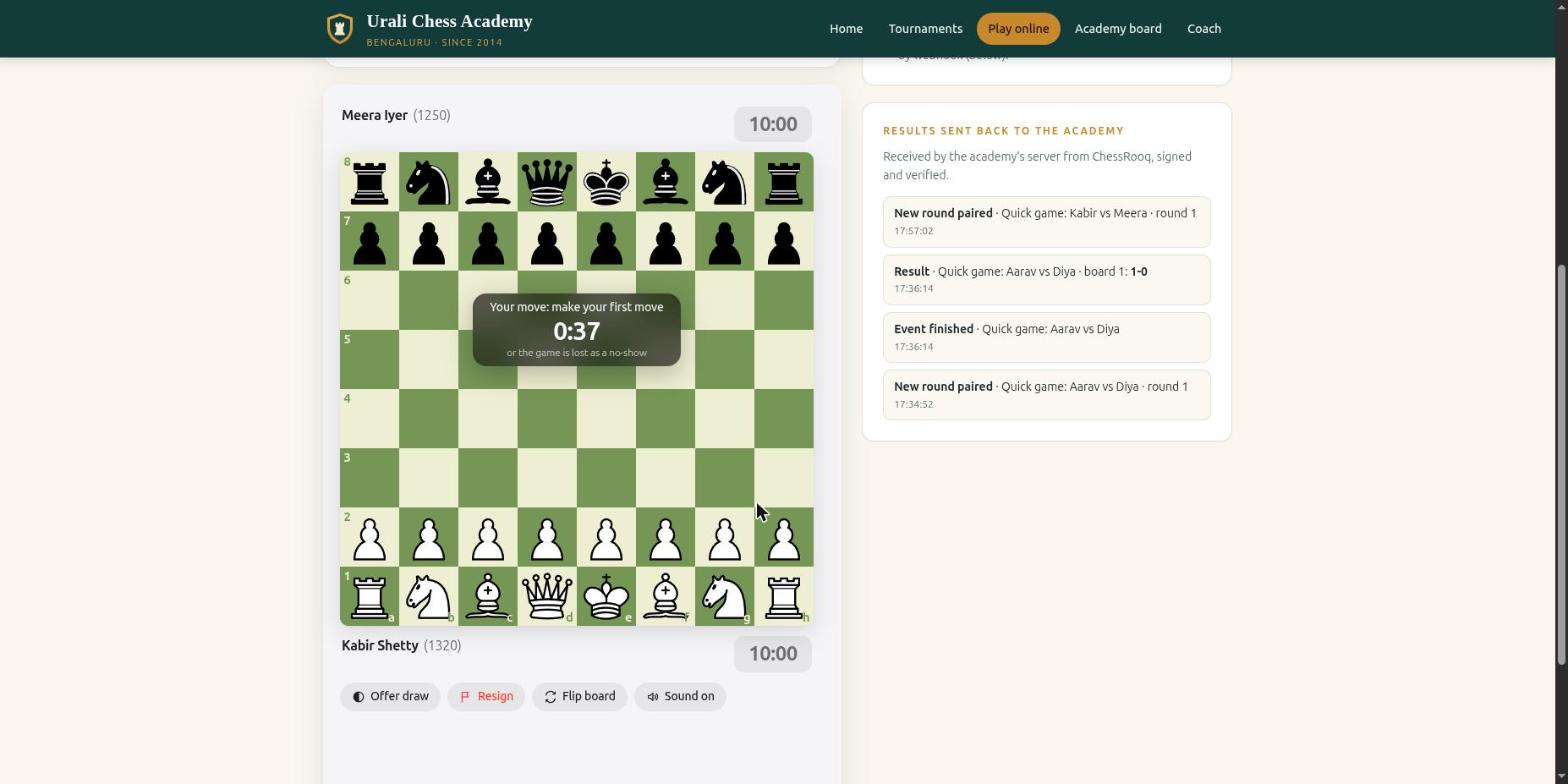
Receive results by webhook
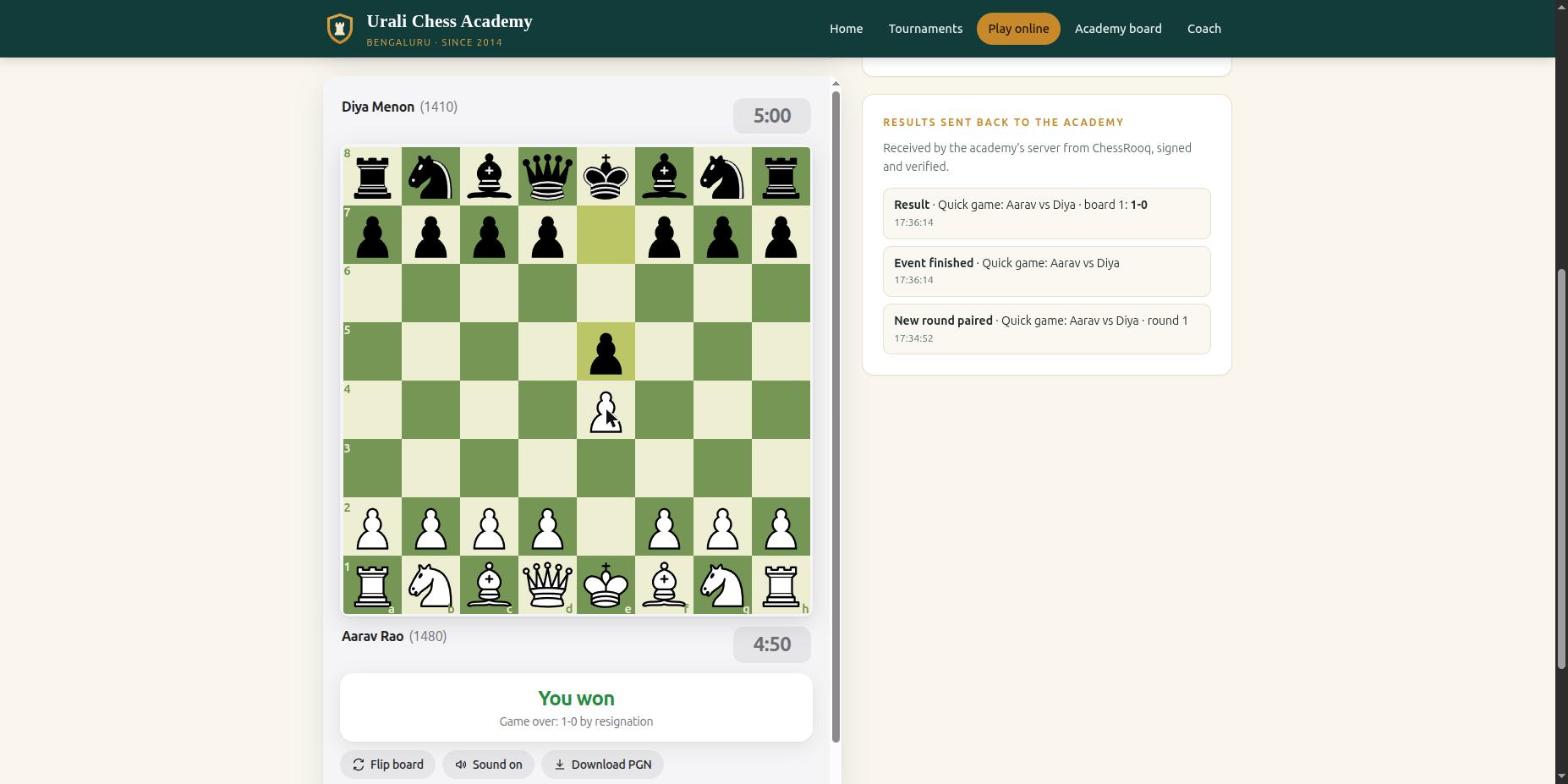
Register once; ChessRooq then calls your server as things happen. Each call is signed with your secret, so you can trust it.
curl -s -X POST $API/v1/webhooks -H "$KEY" -H "Content-Type: application/json" \
     -d '{"url":"https://demo.chessrooq.com/app/api/webhooks/arbiter",
          "events":["result.recorded","round.paired","tournament.completed"]}'
# → { "id": …, "secret": "whsec_…" }   ← shown once: store it on the server
Check the X-Arbiter-Signature: t=<time>,v1=<hex> header: HMAC-SHA256 of "<t>.<raw body>" with your secret, and refuse anything older than 5 minutes.
// academy-server.mjs, line 92
function verifyWebhook(body, header) {
  const parts = Object.fromEntries((header ?? '').split(',').map((p) => p.split('=')));
  const t = Number(parts.t);
  if (!t || Math.abs(Date.now() / 1000 - t) > 300) return false;          // too old: a replay
  const expected = createHmac('sha256', SECRET).update(`${t}.${body}`).digest('hex');
  return parts.v1?.length === expected.length && timingSafeEqual(Buffer.from(parts.v1), Buffer.from(expected));
}
Option 5 · Your own screens on the live game
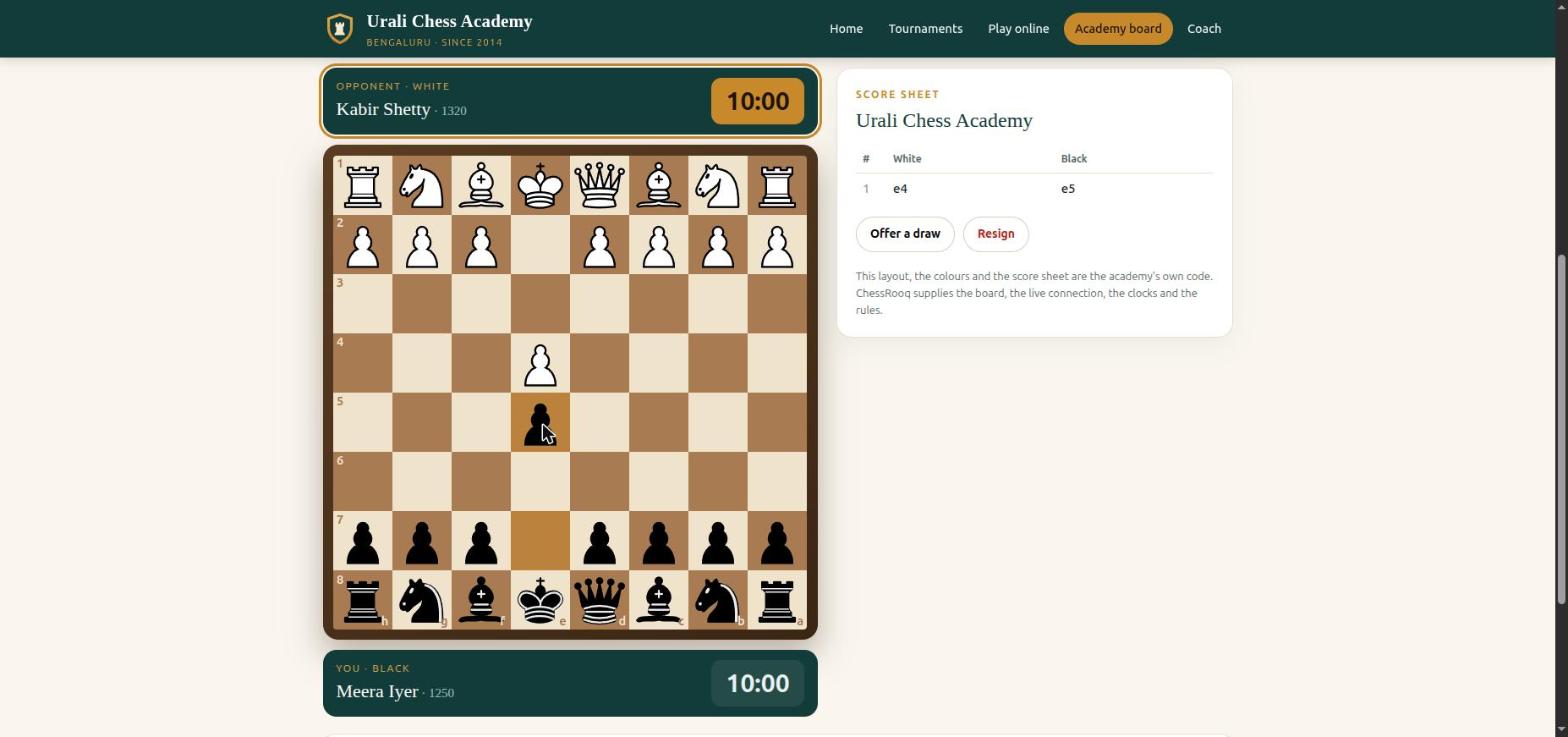
Steps 1 to 4 of option 4 stay the same. Instead of framing pageUrl, your page connects to the game with url and draws everything itself. ChessRooq still runs the rules, clocks and results. See it on Academy board; the code: custom-board.tsx.
- the board (our
ChessBoardcomponent, or your own) and making moves - both clocks, counting down between the server's updates, and the first-move countdown
- the move list, draw offers, resign, and the end-of-game result
- reconnecting after a dropped connection (our components do this for you)
With our React components
@chessrooq/arbiter-react gives you the board and two hooks; the layout is yours. (Not on npm yet: ChessRooq sends the package on request.)
import { ChessBoard, formatClock, useArbiterConnection, useArbiterGame } from '@chessrooq/arbiter-react';

function AcademyGame({ url }) {                       // url from your server (option 4, step 4)
  const conn = useArbiterConnection(url);             // live connection, reconnects by itself
  const { game, clock } = useArbiterGame(conn);       // the game, with clocks that tick
  if (!game) return <p>Connecting…</p>;
  const me = conn.color;                              // 'white' | 'black' for a player

  return (
    <div style={{ '--arbiter-light': '#efe3cc', '--arbiter-dark': '#a87b52' }}>   {/* your board colours */}
      <YourPlayerCard name={game.blackName} time={formatClock(clock.black)} />
      <ChessBoard fen={game.fen} orientation={me ?? 'white'} premoves
                  movable={game.status === 'active' && me ? me : 'none'}
                  onMove={(uci) => conn.move(uci)} />
      <YourScoreSheet moves={game.moves} />
      <button onClick={() => conn.offerDraw()}>Offer a draw</button>
      <button onClick={() => conn.resign()}>Resign</button>
    </div>
  );
}
Or with no library at all (any language)
The live game is a plain WebSocket with JSON messages, so it works from React Native, Flutter, native apps or a server. Full list: realtime-protocol.md.
const ws = new WebSocket(url);                         // wss://…/rt/v1?token=…
ws.onmessage = (e) => {
  const { type, data } = JSON.parse(e.data);
  if (type === 'round.paired') myColor = data.color;     // tournament links: your colour per round
  if (type === 'game.state')   draw(data);               // full game: fen, clocks, moves
  if (type === 'game.move')    applyMove(data);          // { ply, uci, san, fen, whiteMs, blackMs, deadline }
  if (type === 'game.ended')   showResult(data);         // { result: "1-0", termination: "resign" }
};
ws.send(JSON.stringify({ type: 'move', uci: 'e2e4', ref: 'm1' }));   // answered by an "ack" with ref m1
setInterval(() => ws.send(JSON.stringify({ type: 'ping' })), 15000); // notice dead connections (phones)url: the server sends the whole game again.API calls the demo academy uses
| Call | What for | Option |
|---|---|---|
GET/PUT /v1/tenant/branding | Name, colours, sites allowed to embed | 3, 4 |
GET /v1/tournaments | List events (code, status, round) | 3 |
PUT /v1/players/{yourId} | Create or update a student | 4, 5 |
POST /v1/tournaments | Create an event | 4, 5 |
POST /v1/tournaments/{id}/entries | Enter students (with ratings) | 4, 5 |
POST /v1/tournaments/{id}/start, /rounds | Start, pair round 1 | 4, 5 |
POST /v1/tournaments/{id}/play-token | A student's board link (pageUrl) and live connection (url) | 4, 5 |
POST /v1/tournaments/{id}/viewer-token | Watch every board (for a hall screen) | 4, 5 |
POST /v1/webhooks | Results back to your server | 4, 5 |
wss://…/rt/v1?token=… | The live game | 5 |
Everything else (standings, crosstable, PGN and FIDE exports, CSV upload, corrections, data export and erase) is in the API reference.
Files to download
| File | What it is |
|---|---|
| academy-server.mjs | This site's whole back end: students, coach actions, play links, webhook check. Node 18+, no libraries. |
| custom-board.tsx | The academy board (option 5) with @chessrooq/arbiter-react |
| embed-snippet.html | The option 3 frame, ready to paste |
| realtime-protocol.md | The live game protocol, message by message |
| openapi.yaml | The API as OpenAPI 3.1: import into Postman, or generate a client |
Data and privacy
- Walled off: each academy's data is separate, enforced in the database itself; no key, login or page can reach another academy's data.
- Public pages show names, pairings, results and live boards only, never birth dates, phone numbers, emails or guardians.
- Keep it minimal (options 4 and 5): send only what events need (a name and your id is enough); your system can stay the master copy.
- Your rights: an Admin (or the API) can download all the academy's data, download one player's data, or erase a player. Erased players stay in past results as "Deleted player".
- Players are often children: collect guardian consent in your own system before sending a student's details.
Glossary
| Event / tournament | One competition: Swiss, round robin or arena; over the board or online. |
| Event code | The 6-digit number of an event, for its public page. |
Your id / ext: | Your own id for a student or event, used in the API as ext:<id> instead of ours. |
| Game link / play token | A private link for one player, valid for one event for 3 hours. pageUrl opens ChessRooq's board; url is the live connection for your own screen. |
| Viewer link | A watch-only link to every board of the current round. |
| Webhook | A signed message ChessRooq sends to your server when something happens (a result, a new round, the end). |
| Sandbox / live | The test service (keys start crq_test_) and the real one (crq_live_). |
| Embed | Showing a ChessRooq page inside your own page in a frame; your site must be allowed in Settings. |
When something fails
| You see | Why, and what to do |
|---|---|
| The frame stays blank | Your site is not allowed to embed: add its exact address (with https://, no path) in Settings → Sites allowed to embed. |
401 from the API | Wrong or missing key, or a sandbox key used against a live address. |
404 for a player or event | It belongs to another academy, or the id is wrong. Your ids need the ext: prefix. |
| The board says the link expired | Tokens last 3 hours. Ask your server for a new one. |
| "No game for you right now" | The student is not entered in a running event, or has a bye this round. |
| No webhooks arrive | The URL must be public https. Send a test: POST /v1/webhooks/{id}/test. |
| A game ended as a no-show | Each side has 60 seconds for its first move. The board shows a countdown. |
Going live
- ChessRooq moves your academy to live and gives you a
crq_live_…key and the live API address. - Change two server settings (the key and the address); nothing else in your code changes.
- Register your webhook again against live, and store its new secret.
- Optional: your own domain for the academy pages (e.g.
tournament.youracademy.in), one DNS record. - Later, to change keys (a developer leaves, a yearly rotation): ChessRooq issues a new key while the old one keeps working; you switch, and the old one is revoked.
Questions: anup@chessrooq.com